> ## Documentation Index
> Fetch the complete documentation index at: https://docs.soneka.africa/llms.txt
> Use this file to discover all available pages before exploring further.
# Broadcasts: Template Bulk Sends with Per-Recipient Tracking
> Template-based bulk sends with per-recipient delivery tracking, retry-failed, multi-device splits, and link-click analytics — the clean, trackable way to run WhatsApp outreach.
## Overview
**Broadcasts** are bulk sends built around a single **template**, with detailed delivery tracking for each recipient. Find them under **More → Broadcasts**. Because every broadcast goes out from one approved template, it's the right tool for clean, trackable outreach at scale — promotions, notifications, and re-engagement.
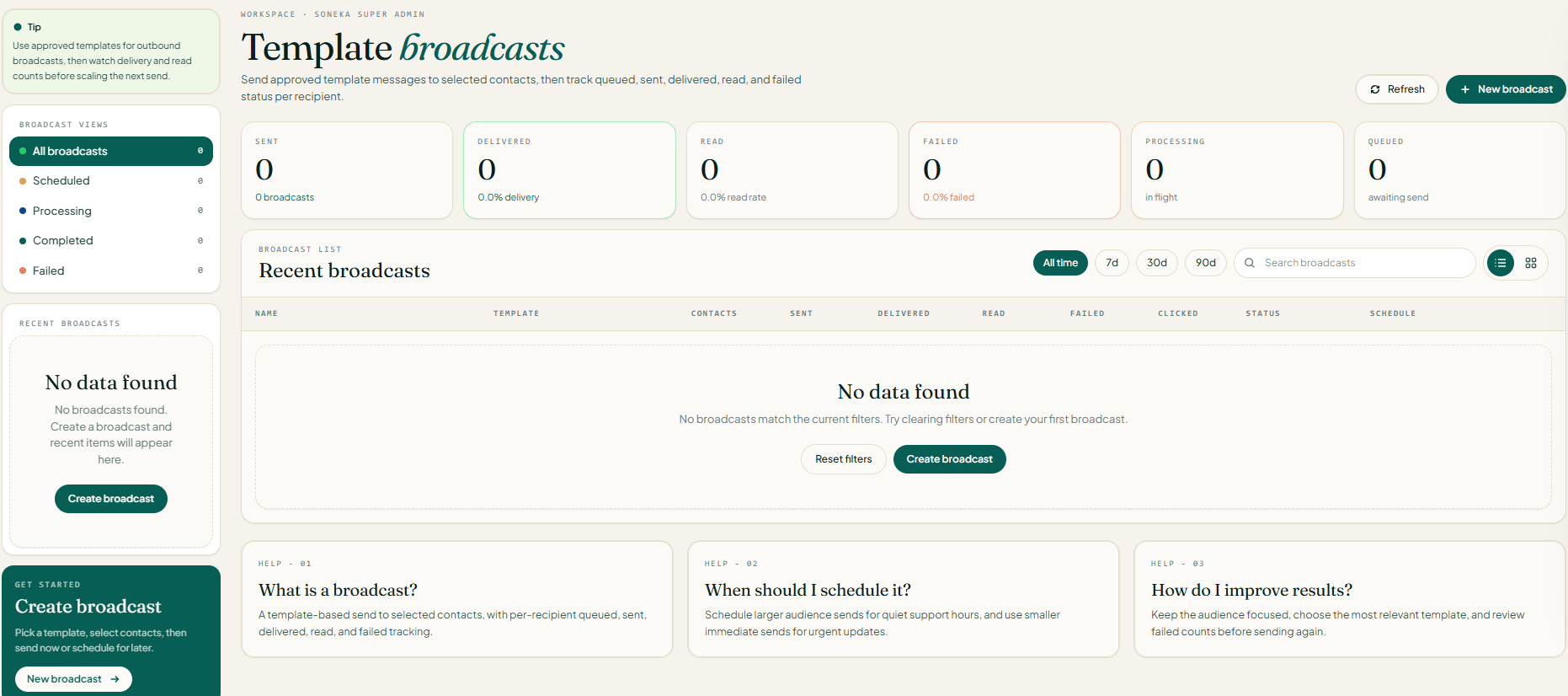 For each broadcast, every recipient is tracked through the full WhatsApp delivery journey — queued, sent, delivered, read, or failed — plus per-recipient **link-click analytics** when the template includes tracked links. You can **retry just the recipients who failed** without re-sending to everyone, and **split a broadcast across multiple connected numbers** to spread the sending load.
**Access:** Broadcasts require the **Admin** workspace role and a plan that includes the Broadcast feature. Your plan also sets a limit on how many broadcasts the workspace can create.
## Engines & Template Pre-Flight
A broadcast sends through the workspace's active engine, and the template picker only lists **approved** templates:
| Engine | How the template is sent |
| ----------------------------- | ---------------------------------------------------------------------------------------------------------------------------------------------------------------------------------------------------------- |
| **Unofficial API** | The template's header, body, footer, and buttons are sent like a normal message. |
| **Business API** (Meta Cloud) | For a Meta-approved template, Soneka builds the full rich message for each recipient — buttons, carousel cards, media headers, and per-recipient tracked links — and sends it to Meta exactly as approved. |
| **Twilio** | A template registered with Twilio sends as a proper Twilio template; one that isn't sends as plain text. |
Before a broadcast goes out, Soneka checks the template first so you never waste your sending allowance on a send that's bound to fail:
* **Authentication (OTP) templates are blocked** — each recipient needs a unique verifiable code, which a broadcast can't provide. Send those one at a time from your own system.
* **Media headers must be reachable** over a public HTTPS link. This check runs on all engines whenever the template has a media header: plain `http://` links, private or internal addresses, and `localhost` / `.local` / `.test` / `.internal` hosts are rejected, because the recipient's phone (and Meta) can't download from them.
* **On the Business API,** a template that isn't approved by Meta, is paused for quality, or has fallen below your minimum quality setting is refused with a clear reason.
## Creating a Broadcast
Click **Add Broadcast** on the broadcasts list to open the composer, then work top to bottom:
Enter a broadcast name for your own reference in reports.
Choose an approved template from the dropdown. A live preview shows the header, body, footer, buttons, and any media so you can check exactly what will go out.
Select one or more **contacts** and/or **contact groups**. Group members are pulled in and merged into one list with duplicates removed. You must select at least one contact or group, or the form asks you to.
Choose one number, or tick several for a multi-device send (see [Multi-Device Sending](#multi-device-sending)).
Pick **Send now** to send immediately, or **Schedule for later** and set a date, time, and time zone (your workspace time zone is pre-selected).
When you submit, Soneka creates the broadcast (status *processing* for an immediate send, or *scheduled* for later), records which engine it's using, adds every recipient to the list as **pending**, and starts the send. Scheduled sends carry the exact time and time zone so they always fire at the right local moment.
## Per-Recipient Funnel
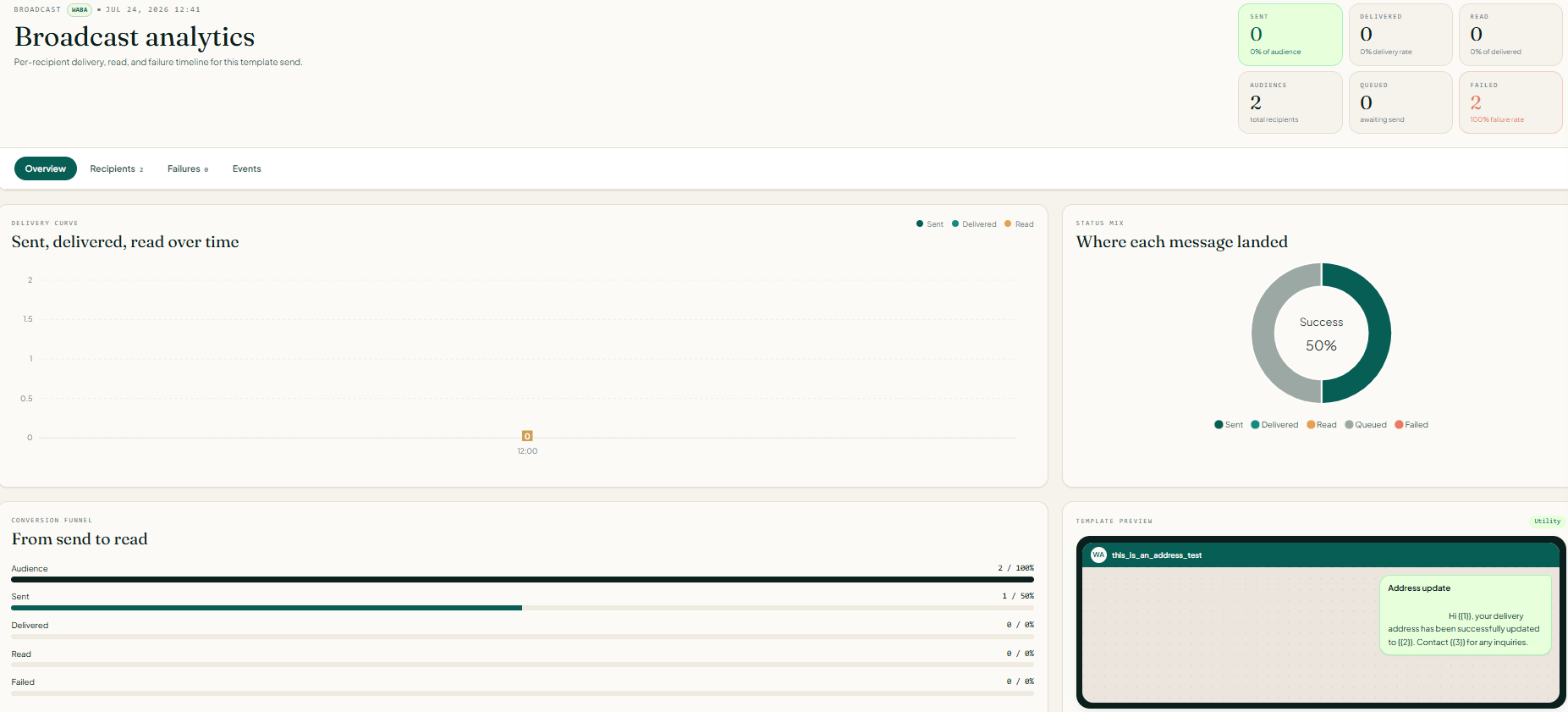
The broadcast detail page centers on the recipient grid. As WhatsApp reports back, each recipient moves through the delivery journey and the summary tiles (Sent, Delivered, Read, Failed, Queued, Clicked) update live. The stages build on each other: *read* means the message was also delivered and sent, so the tiles always stay consistent.
For each broadcast, every recipient is tracked through the full WhatsApp delivery journey — queued, sent, delivered, read, or failed — plus per-recipient **link-click analytics** when the template includes tracked links. You can **retry just the recipients who failed** without re-sending to everyone, and **split a broadcast across multiple connected numbers** to spread the sending load.
**Access:** Broadcasts require the **Admin** workspace role and a plan that includes the Broadcast feature. Your plan also sets a limit on how many broadcasts the workspace can create.
## Engines & Template Pre-Flight
A broadcast sends through the workspace's active engine, and the template picker only lists **approved** templates:
| Engine | How the template is sent |
| ----------------------------- | ---------------------------------------------------------------------------------------------------------------------------------------------------------------------------------------------------------- |
| **Unofficial API** | The template's header, body, footer, and buttons are sent like a normal message. |
| **Business API** (Meta Cloud) | For a Meta-approved template, Soneka builds the full rich message for each recipient — buttons, carousel cards, media headers, and per-recipient tracked links — and sends it to Meta exactly as approved. |
| **Twilio** | A template registered with Twilio sends as a proper Twilio template; one that isn't sends as plain text. |
Before a broadcast goes out, Soneka checks the template first so you never waste your sending allowance on a send that's bound to fail:
* **Authentication (OTP) templates are blocked** — each recipient needs a unique verifiable code, which a broadcast can't provide. Send those one at a time from your own system.
* **Media headers must be reachable** over a public HTTPS link. This check runs on all engines whenever the template has a media header: plain `http://` links, private or internal addresses, and `localhost` / `.local` / `.test` / `.internal` hosts are rejected, because the recipient's phone (and Meta) can't download from them.
* **On the Business API,** a template that isn't approved by Meta, is paused for quality, or has fallen below your minimum quality setting is refused with a clear reason.
## Creating a Broadcast
Click **Add Broadcast** on the broadcasts list to open the composer, then work top to bottom:
Enter a broadcast name for your own reference in reports.
Choose an approved template from the dropdown. A live preview shows the header, body, footer, buttons, and any media so you can check exactly what will go out.
Select one or more **contacts** and/or **contact groups**. Group members are pulled in and merged into one list with duplicates removed. You must select at least one contact or group, or the form asks you to.
Choose one number, or tick several for a multi-device send (see [Multi-Device Sending](#multi-device-sending)).
Pick **Send now** to send immediately, or **Schedule for later** and set a date, time, and time zone (your workspace time zone is pre-selected).
When you submit, Soneka creates the broadcast (status *processing* for an immediate send, or *scheduled* for later), records which engine it's using, adds every recipient to the list as **pending**, and starts the send. Scheduled sends carry the exact time and time zone so they always fire at the right local moment.
## Per-Recipient Funnel
The broadcast detail page centers on the recipient grid. As WhatsApp reports back, each recipient moves through the delivery journey and the summary tiles (Sent, Delivered, Read, Failed, Queued, Clicked) update live. The stages build on each other: *read* means the message was also delivered and sent, so the tiles always stay consistent.
 | Status | Meaning |
| -------------------- | ----------------------------------------------------------------------------------------------------------------------------- |
| **pending** (Queued) | The recipient is in the list, waiting their turn to be sent to. |
| **sent** | The message was handed to WhatsApp and accepted. |
| **delivered** | WhatsApp confirmed the message reached the recipient's device. |
| **read** | The recipient opened the message (when read receipts are available). |
| **failed** | The send didn't succeed; the reason is shown (e.g. "Not on WhatsApp", out of sending allowance, or a media download problem). |
Status updates are de-duplicated, so repeated reports from WhatsApp never double-count. The detail page also charts deliveries over time, a status donut, and a **breakdown of failure reasons** (top 8, with the rest grouped under "Other") so you can spot recurring problems — such as a batch of invalid numbers — at a glance.
**Always consistent:** The per-recipient grid and the summary tiles are recalculated together on every update, so the headline numbers always match the individual rows.
## Link-Click Tracking
When a template contains link buttons (or links in the body), Soneka replaces each one with a unique tracked link for every recipient. Tracked links expire after a set period (90 days by default, minimum 7 days). When a recipient taps the link, the click is recorded against that exact contact and they're sent on to the real destination immediately.
* The recipient grid shows a **click count** and last-click time for each contact.
* The **Clicked** tile counts how many unique contacts tapped any tracked link, with a click-through rate compared to messages delivered.
* Re-sending the same link to the same contact reuses the **same tracked link**, so retries never inflate your numbers.
* Link-preview crawlers and bots are sent through but **not counted**, so your numbers reflect real people. An admin can turn link tracking off platform-wide, in which case the original links are used as-is.
**Related:** Soneka's separate [WhatsApp link generator](/features/link-generator) creates shareable chat links that open WhatsApp with a pre-typed message and count their own clicks. That's for public, shareable links — different from the per-recipient tracking described here.
## Retrying Failed Recipients
Failures are common after a temporary glitch — an out-of-date media link, a connection drop mid-run, or a batch of invalid numbers. Rather than re-send to your whole audience, use **Retry failed** on the detail page:
Reconnect the number, correct the media link, top up credits, etc.
Soneka resets every failed recipient back to **pending**, clears their old error, sets the broadcast back to *processing*, and sends again **only to those recipients**.
The retried recipients move back through the stages, while everyone who already succeeded is left untouched.
If there are no failed recipients, you'll see "No failed recipients to retry."
**Note:** Retry sends only to recipients who failed before, so a contact who already received the message is never messaged — or charged — twice.
## Multi-Device Sending
Selecting two or more connected numbers splits the broadcast into **one broadcast per number** and **divides the audience** between them. By default the split is even; you can set **share weights** per number (for example 7/3) to send more through one number than another.
The split always adds up exactly to your audience size and lands as close as possible to the weights you set. Each contact goes to exactly one number, so **no one ever receives a duplicate**, and any empty share (e.g. 1 contact across 2 numbers) is skipped. Spreading volume across numbers lowers how fast each number sends — a useful safety measure against bans on the Unofficial API.
## Broadcast Statuses
The list page groups broadcasts by their overall lifecycle status:
| Status | Meaning |
| --------------------------- | -------------------------------------------------------------------------------------------------------------------------------------------------- |
| **scheduled** | Saved for a future date/time and waiting to fire. |
| **processing** | Actively sending to recipients right now. |
| **completed** | The run finished and every recipient succeeded. |
| **completed\_with\_errors** | The run finished but some recipients failed — a good moment to use Retry failed. |
| **failed** | The broadcast couldn't run at all — e.g. no usable sender number, every contact had an empty phone number, or the sending service was unreachable. |
The final status is confirmed once at the end of the run, as a safety net in case any individual delivery updates were missed.
**Delete rules:** Only **scheduled** or **failed** broadcasts can be deleted — any other state shows "Only scheduled or failed broadcasts can be deleted." Deleting first cancels any in-progress send so it's never left half-finished, then removes the broadcast. Completed broadcasts are kept for their reporting history.
## Ban-Safety & Pacing
Broadcasts are paced by the same safety controls the rest of Soneka uses, set by your admin under **Admin → Settings → System Message → Sender pacing**:
| Control | Default | Effect |
| -------------------------- | ------------------- | ----------------------------------------------------------------- |
| Message gap | 3 seconds | Delay between one message and the next, varied randomly by ±20%. |
| Batch size | 50 recipients | How many messages go out before a pause (when batching is on). |
| Batch gap | 5 minutes | Cooldown between batches, varied randomly by ±20%. |
| Daily cap (Unofficial API) | 4000 / day / number | Maximum messages a single number can send per day (resets daily). |
If a connection drops mid-run on the Unofficial API, the broadcast is paused instead of sending into a dead connection and wrongly marking the remaining recipients as failed.
**Send responsibly.** Broadcast only to contacts who opted in, keep templates relevant and personalized, warm up new numbers gradually, and split very large audiences across multiple numbers. Blasting unsolicited templates to cold lists is the quickest route to a quality downgrade or a banned number. On the Business API, watch template quality: a broadcast on a paused or low-quality template is refused before it sends, because pushing volume through a struggling template makes it worse and can trigger a Meta block — let the quality score recover, or switch to a healthier template, before broadcasting again.
| Status | Meaning |
| -------------------- | ----------------------------------------------------------------------------------------------------------------------------- |
| **pending** (Queued) | The recipient is in the list, waiting their turn to be sent to. |
| **sent** | The message was handed to WhatsApp and accepted. |
| **delivered** | WhatsApp confirmed the message reached the recipient's device. |
| **read** | The recipient opened the message (when read receipts are available). |
| **failed** | The send didn't succeed; the reason is shown (e.g. "Not on WhatsApp", out of sending allowance, or a media download problem). |
Status updates are de-duplicated, so repeated reports from WhatsApp never double-count. The detail page also charts deliveries over time, a status donut, and a **breakdown of failure reasons** (top 8, with the rest grouped under "Other") so you can spot recurring problems — such as a batch of invalid numbers — at a glance.
**Always consistent:** The per-recipient grid and the summary tiles are recalculated together on every update, so the headline numbers always match the individual rows.
## Link-Click Tracking
When a template contains link buttons (or links in the body), Soneka replaces each one with a unique tracked link for every recipient. Tracked links expire after a set period (90 days by default, minimum 7 days). When a recipient taps the link, the click is recorded against that exact contact and they're sent on to the real destination immediately.
* The recipient grid shows a **click count** and last-click time for each contact.
* The **Clicked** tile counts how many unique contacts tapped any tracked link, with a click-through rate compared to messages delivered.
* Re-sending the same link to the same contact reuses the **same tracked link**, so retries never inflate your numbers.
* Link-preview crawlers and bots are sent through but **not counted**, so your numbers reflect real people. An admin can turn link tracking off platform-wide, in which case the original links are used as-is.
**Related:** Soneka's separate [WhatsApp link generator](/features/link-generator) creates shareable chat links that open WhatsApp with a pre-typed message and count their own clicks. That's for public, shareable links — different from the per-recipient tracking described here.
## Retrying Failed Recipients
Failures are common after a temporary glitch — an out-of-date media link, a connection drop mid-run, or a batch of invalid numbers. Rather than re-send to your whole audience, use **Retry failed** on the detail page:
Reconnect the number, correct the media link, top up credits, etc.
Soneka resets every failed recipient back to **pending**, clears their old error, sets the broadcast back to *processing*, and sends again **only to those recipients**.
The retried recipients move back through the stages, while everyone who already succeeded is left untouched.
If there are no failed recipients, you'll see "No failed recipients to retry."
**Note:** Retry sends only to recipients who failed before, so a contact who already received the message is never messaged — or charged — twice.
## Multi-Device Sending
Selecting two or more connected numbers splits the broadcast into **one broadcast per number** and **divides the audience** between them. By default the split is even; you can set **share weights** per number (for example 7/3) to send more through one number than another.
The split always adds up exactly to your audience size and lands as close as possible to the weights you set. Each contact goes to exactly one number, so **no one ever receives a duplicate**, and any empty share (e.g. 1 contact across 2 numbers) is skipped. Spreading volume across numbers lowers how fast each number sends — a useful safety measure against bans on the Unofficial API.
## Broadcast Statuses
The list page groups broadcasts by their overall lifecycle status:
| Status | Meaning |
| --------------------------- | -------------------------------------------------------------------------------------------------------------------------------------------------- |
| **scheduled** | Saved for a future date/time and waiting to fire. |
| **processing** | Actively sending to recipients right now. |
| **completed** | The run finished and every recipient succeeded. |
| **completed\_with\_errors** | The run finished but some recipients failed — a good moment to use Retry failed. |
| **failed** | The broadcast couldn't run at all — e.g. no usable sender number, every contact had an empty phone number, or the sending service was unreachable. |
The final status is confirmed once at the end of the run, as a safety net in case any individual delivery updates were missed.
**Delete rules:** Only **scheduled** or **failed** broadcasts can be deleted — any other state shows "Only scheduled or failed broadcasts can be deleted." Deleting first cancels any in-progress send so it's never left half-finished, then removes the broadcast. Completed broadcasts are kept for their reporting history.
## Ban-Safety & Pacing
Broadcasts are paced by the same safety controls the rest of Soneka uses, set by your admin under **Admin → Settings → System Message → Sender pacing**:
| Control | Default | Effect |
| -------------------------- | ------------------- | ----------------------------------------------------------------- |
| Message gap | 3 seconds | Delay between one message and the next, varied randomly by ±20%. |
| Batch size | 50 recipients | How many messages go out before a pause (when batching is on). |
| Batch gap | 5 minutes | Cooldown between batches, varied randomly by ±20%. |
| Daily cap (Unofficial API) | 4000 / day / number | Maximum messages a single number can send per day (resets daily). |
If a connection drops mid-run on the Unofficial API, the broadcast is paused instead of sending into a dead connection and wrongly marking the remaining recipients as failed.
**Send responsibly.** Broadcast only to contacts who opted in, keep templates relevant and personalized, warm up new numbers gradually, and split very large audiences across multiple numbers. Blasting unsolicited templates to cold lists is the quickest route to a quality downgrade or a banned number. On the Business API, watch template quality: a broadcast on a paused or low-quality template is refused before it sends, because pushing volume through a struggling template makes it worse and can trigger a Meta block — let the quality score recover, or switch to a healthier template, before broadcasting again.