
What an AI Agent Can Do
Answer Customer Questions
The agent searches your knowledge base to find accurate answers and responds in natural, conversational language — in the customer’s own language if needed.
Qualify and Capture Leads
Ask pre-defined qualifying questions, collect contact details, and push structured data to your CRM or a connected flow.
Handle Escalation
Detect when a customer is frustrated, asks a question the agent can’t answer, or explicitly requests a human — then seamlessly hand off to a live agent with full conversation context.
Voice Interaction
Via WA Calling, an AI agent can answer inbound calls, handle voicemail, and transcribe the conversation for your team to review.
Supported LLM Providers
Soneka connects to five AI providers. You can choose the model that best fits your use case, cost tolerance, and compliance requirements.OpenAI
GPT-4o and GPT-4 Turbo. Best general-purpose reasoning and instruction-following.
Anthropic Claude
Claude 3.5 Sonnet and Haiku. Excellent for nuanced, long-context customer support conversations.
Google Gemini
Gemini 1.5 Pro and Flash. Strong multilingual performance and fast response times.
Mistral
Mistral Large and Nemo. Open-weight models suited to on-premise or privacy-sensitive deployments.
ElevenLabs
Voice synthesis for AI Calling. Produces natural-sounding speech for outbound and voicemail scenarios.
The model you select applies per agent. You can run different agents with different providers — for example, Claude for support and Gemini for sales qualification.
Building a RAG Knowledge Base
Retrieval-Augmented Generation (RAG) grounds your agent’s answers in your own content rather than relying solely on the model’s training data. This means fewer hallucinations and answers that actually reflect your products, policies, and processes.Bring Your Own Key (BYOK)
On the Enterprise plan, you can connect your own API keys for any supported provider instead of using Soneka’s shared credentials. BYOK gives you direct cost visibility, the ability to use private model deployments (such as Azure OpenAI), and ensures that inference traffic is billed directly to your account. To configure BYOK, go to Settings → AI → API Keys, select a provider, and paste your key. Soneka validates the key against the provider’s API before saving.PII Protection
Customer messages often contain names, phone numbers, email addresses, national IDs, and payment details. Soneka automatically redacts PII before the message reaches the AI model. The redaction layer runs on Soneka’s infrastructure and replaces detected sensitive tokens with neutral placeholders (e.g.[NAME], [EMAIL]). The original values are never logged or sent to the provider.
Create an Agent
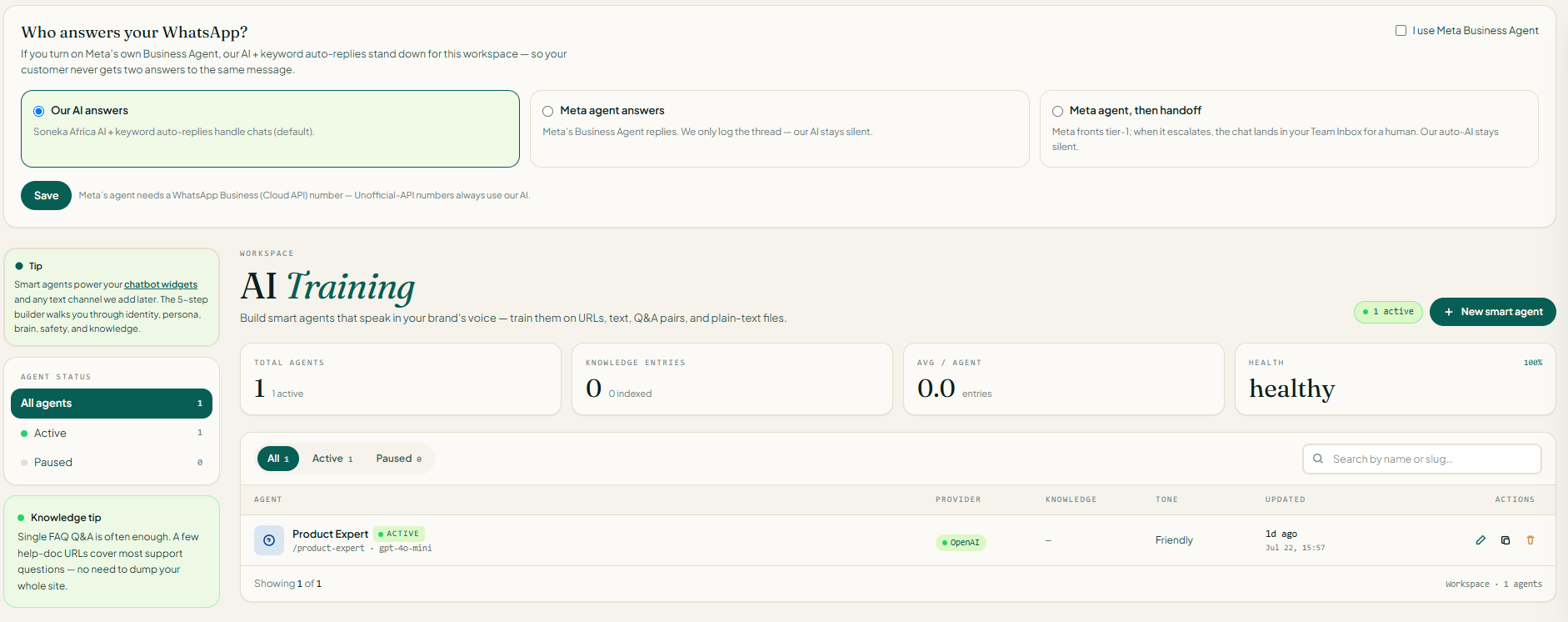
Soneka guides you through a 5-step wizard to build a smart agent. Open AI Training → New and follow each stage — you can Save draft at any point and return later; the wizard stays inDraft / unsaved until you complete step 5.
1
Identity
Give the agent a name, pick its language, and decide how it should sound.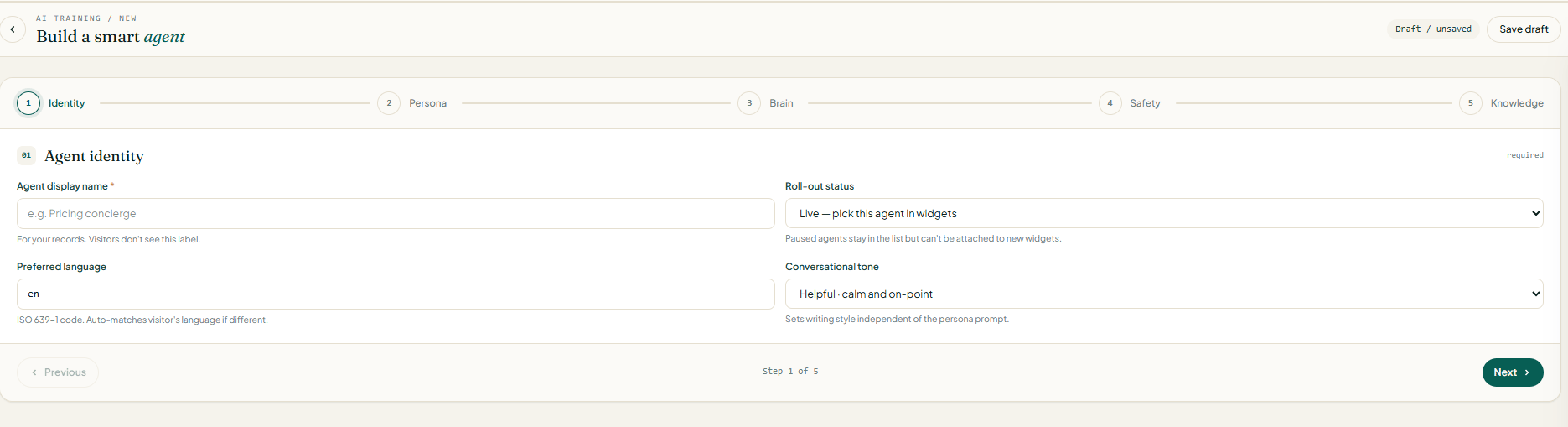
Click Next to continue.
2
Persona & opening line
Define the agent’s voice and its very first message.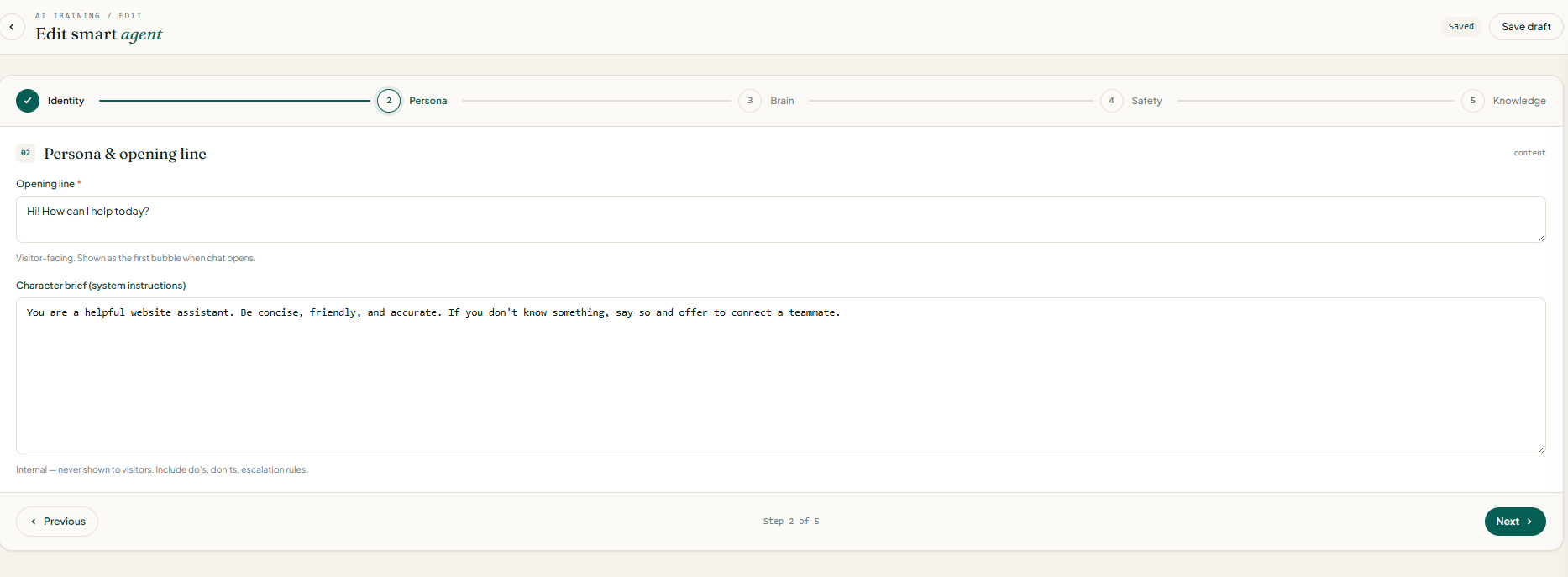
- Opening line (required, visitor-facing) — the first bubble shown when a chat opens. Keep it short and warm, e.g.
Hi! How can I help today?. - Character brief (system instructions) — internal prompt that shapes every reply. Never shown to visitors. Include:
- Do’s and don’ts (topics to cover, topics to refuse)
- Escalation rules (when to hand off to a human)
- House style (formal / casual, emoji use, length)
3
Brain — model & reply controls
Choose the LLM and tune how it writes.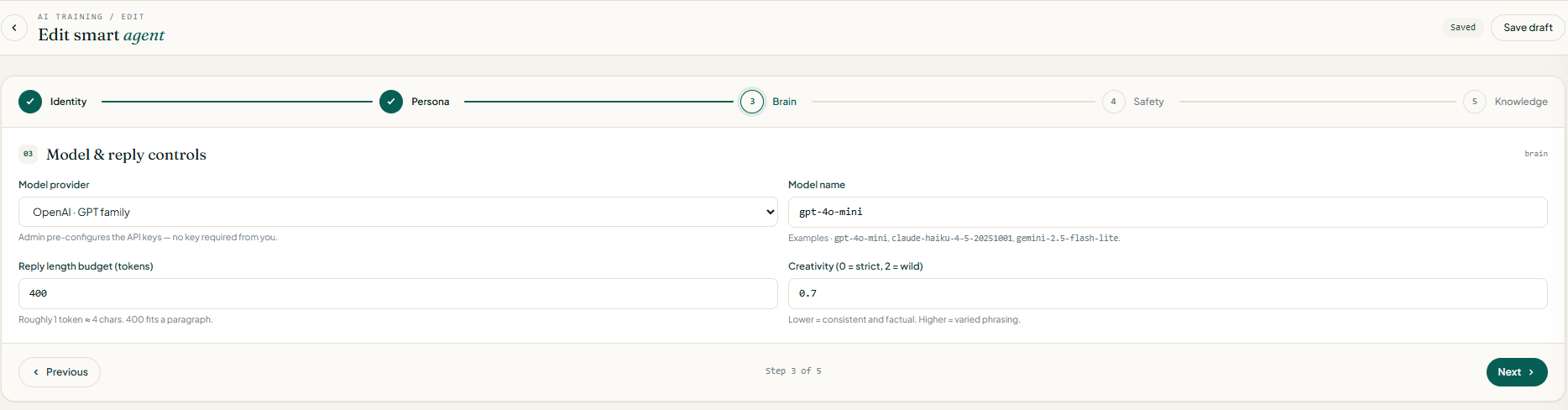
Cheaper models (Haiku, Flash-Lite, GPT-4o-mini) handle 80% of support traffic well. Reserve the flagship models for agents that need nuanced reasoning.
4
Safety — fallback & human handoff
Cover what happens when the model fails or the visitor needs a person.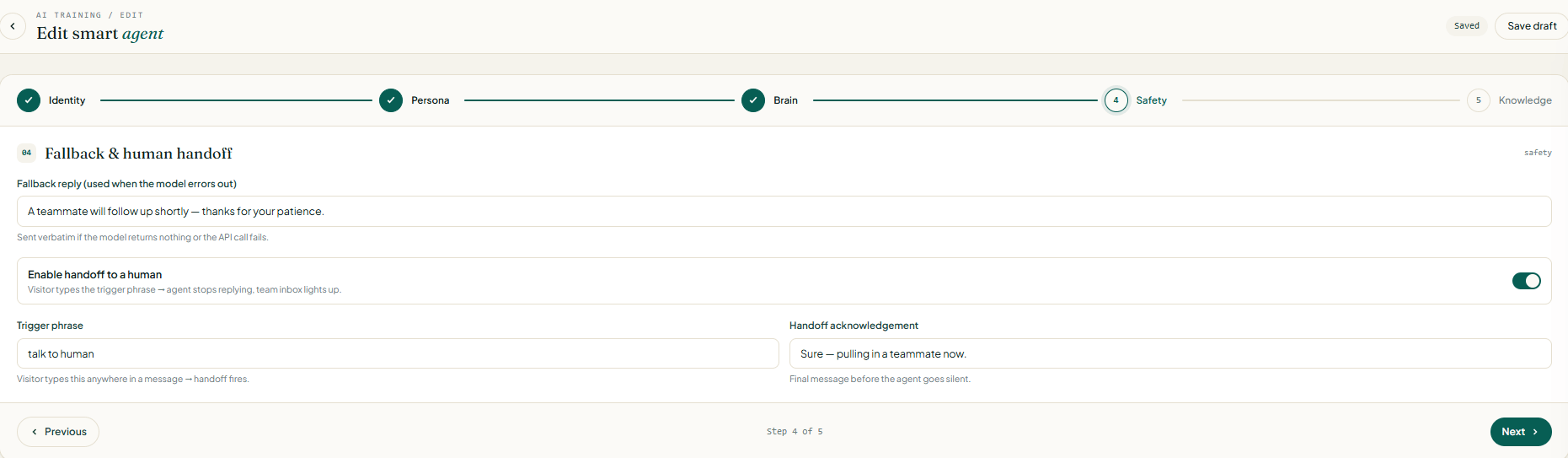
- Fallback reply — sent verbatim if the model returns nothing or the API call fails. Something reassuring like
A teammate will follow up shortly — thanks for your patience.works well. - Enable handoff to a human — toggle on to let visitors escape the bot.
- Trigger phrase — visitor types this anywhere in a message (e.g.
talk to human) and the agent stops replying; the conversation lights up in your team inbox. - Handoff acknowledgement — the final message the agent sends before going silent (e.g.
Sure — pulling in a teammate now.).
5
Knowledge — train the agent
Ground the agent in your own content so it stops hallucinating.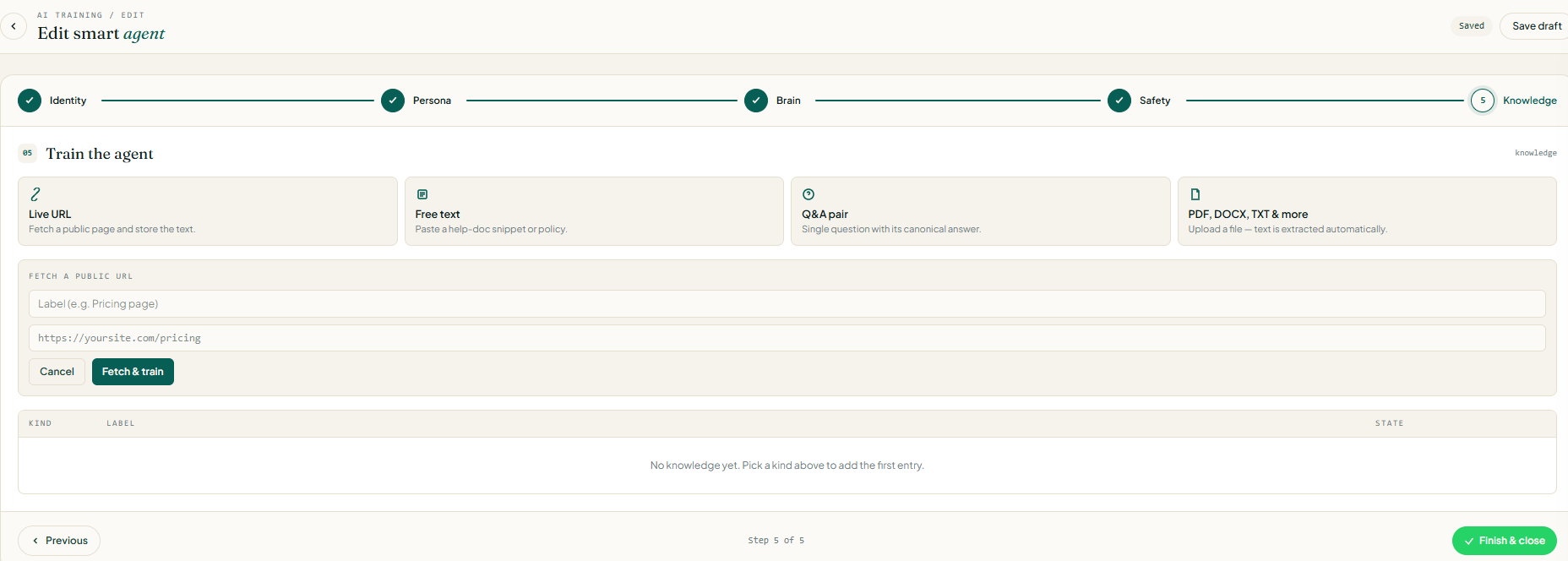
For a Live URL entry: give it a Label (e.g.
Pricing page), paste the URL, and click Fetch & train. The row appears in the knowledge table with its state (Ready, Fetching, Failed).Click Finish & close to save the agent. It’s now available to attach to widgets, auto-reply rules, and flows.Attaching an Agent
- As an Auto-Reply Rule
- Inside a Flow
1
Go to Auto-Reply
Navigate to Messaging → Auto-Reply and click New Rule.
2
Set the Trigger
Choose All incoming messages or a keyword trigger to scope when the agent activates.
3
Set the Action to AI Agent
Under Reply with, select AI Agent and choose the agent you configured.
4
Save and Activate
Toggle the rule on. The agent will now handle all matched inbound messages automatically.
Escalation to a Human Agent
You can configure escalation triggers on any AI agent. When triggered, Soneka pauses the AI, marks the conversation as Needs Human, and notifies the assigned team in the Inbox. Escalation can be triggered by:- A customer typing “agent”, “human”, or “speak to someone” (configurable keywords)
- The agent reaching a maximum turn limit without resolving the query
- The agent’s confidence score falling below your configured threshold
- A specific intent detected in the conversation (e.g. billing dispute, complaint)
AI Voicemail via WA Calling
When a customer calls your WhatsApp number and no agent is available, the AI voicemail agent answers the call using ElevenLabs voice synthesis. It greets the caller, explains that the team is unavailable, and invites them to leave a message or ask a question. The call is recorded, transcribed, and surfaced in the Calling inbox with an AI-generated summary. Your team can listen, read the transcript, and reply by chat or callback.AI voicemail requires the Pro plan or above and must be enabled in Settings → Calling → Voicemail.
Frequently Asked Questions
Does the AI agent reply 24/7?
Does the AI agent reply 24/7?
Yes. Once activated, an AI agent responds to incoming messages at any time of day without any manual intervention. You can optionally set business-hours rules so the agent acknowledges off-hours contacts differently.
Can I train the agent on my own data?
Can I train the agent on my own data?
Yes — that’s exactly what the knowledge base is for. Upload PDFs, DOCX files, or link URLs, and the agent uses RAG to retrieve relevant content when answering. The underlying model itself is not fine-tuned (that remains the provider’s model), but the agent is grounded entirely in your content.
Which plan do I need to use AI Agents?
Which plan do I need to use AI Agents?
AI Agents are available on the Growth plan and above. BYOK is an Enterprise feature. ElevenLabs voice is available on Pro and Enterprise.
What happens if the agent gives a wrong answer?
What happens if the agent gives a wrong answer?
You can review all AI conversations in the Inbox and flag incorrect responses. Flagged conversations are shown in AI → Feedback, where you can correct the answer and add it as a curated knowledge base entry to prevent the same error in future.
Is my customer data used to train the provider's models?
Is my customer data used to train the provider's models?
No. Soneka uses the providers’ API endpoints under data-processing agreements that prohibit using your data for model training. Additionally, PII is redacted before any data leaves Soneka’s infrastructure.
Can I use multiple AI providers at the same time?
Can I use multiple AI providers at the same time?
Yes. You can configure different agents with different providers and deploy them on different auto-reply rules or flow nodes. Only one provider is active per agent at any given time.